Darb UmrahBY DARB LABS

Features

Everything in one calm place.

Darb Umrah is in development, with an invite-only pilot. This is what the first release is designed to include, and the limits that come with it; anything marked “coming” follows later. The screens are from the app, with example data.

The whole Umrah journey

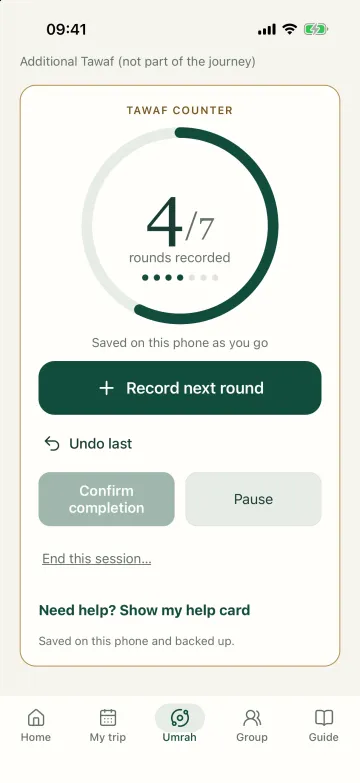
Tap once for each round you complete. The count is saved on your phone as you go and backed up when you have a connection, so a busy moment or a lost signal never costs you your place.

  • Get ready, step by step: your trip, school of thought, prayer times and practice
  • Preparation, miqat and entering ihram
  • Entering the mosque
  • Tawaf, with a counter for its seven rounds
  • The prayers after Tawaf, and Zamzam
  • Sa’i: seven one-way legs between Safa and Marwah
  • Shaving or trimming, and finishing
  • Undo the last tap while the counter is open; Home reopens the counter where you left it
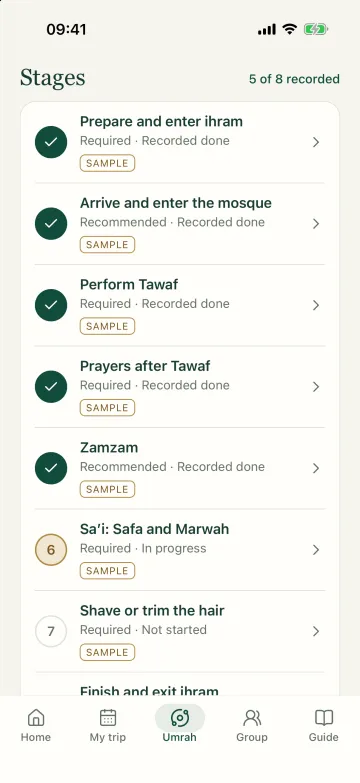
Counters sit inside the journey; a standalone Tawaf counter stays available. You confirm every step, and a finished Umrah stays finished.
The Umrah journey: eight stages, five recorded done, Sa’i in progress and shaving or trimming next
The Tawaf counter at four of seven rounds, with a large button to record the next round, Undo and Pause
From the app · example data

Duas and guidance

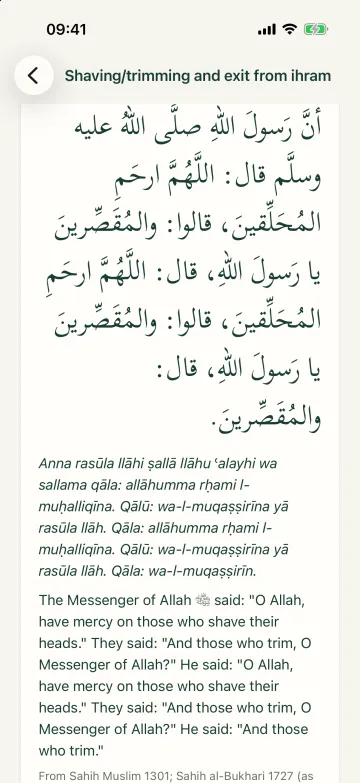
  • Duas for each step of Umrah and each place in Madinah, in Arabic with transliteration and English meaning
  • Each with its source, reference and, for hadith, its grading
  • Downloaded to your phone in one go, ready for use offline
  • Choose your school: Hanafi, Maliki, Shafi‘i or Hanbali, and see only its guidance or your school first with the others
  • Recordings for some duas, with a drag bar, 10-second skips, speeds from 0.5× to 1.5× and read-along
  • Show or hide the transliteration and meaning as you prefer
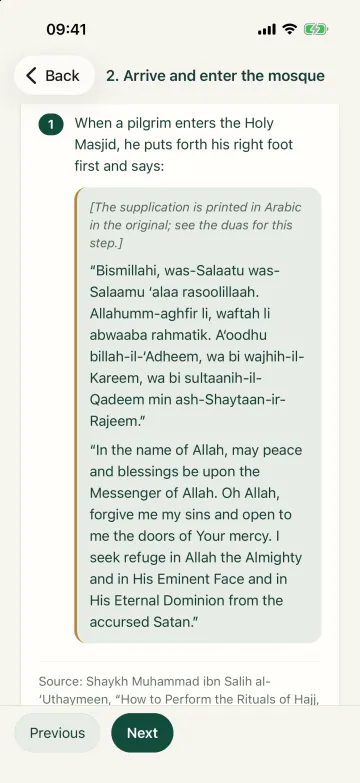
Duas and step instructions come word for word from named sources. Today the step instructions come from two published guides that follow the Hanbali approach, Shaykh al‑‘Uthaymeen’s and a second Hanbali guide, each named with its school; guidance for the Hanafi, Maliki and Shafi‘i schools is being added from published sources and will be reviewed. Some duas have recordings; more are added as licensed ones arrive. Each recording names its reciter.
A dua for shaving or trimming in Arabic, with transliteration, English meaning and its hadith source
Stage 2, arriving and entering the mosque: a numbered step with its dua in transliteration and English meaning, and the guide it comes from
From the app · sourced guidance, not yet reviewed

On your watch and Lock Screen

  • Record Tawaf rounds and Sa’i legs from an Apple Watch
  • A gentle tap after each Tawaf round, with the dua for the next one
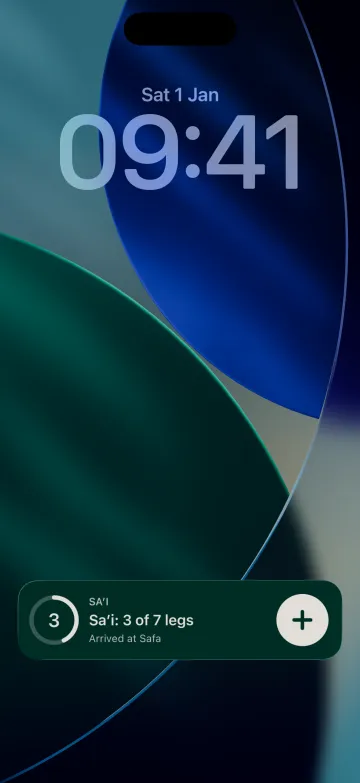
  • On iPhone, the open counter shows on the Lock Screen, with a button to record the next round or leg
  • A Wear OS watch app (coming)
  • The count stays in step with your phone
The watch works with your phone nearby, and the phone keeps the record.
The iPhone Lock Screen showing the open Sa’i counter at three of seven legs, with a button to record the next one
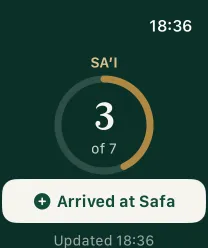
The Apple Watch Sa’i counter at three of seven legs, with a button for arriving at Safa
From the app · example data

Trip organisation

  • My Trip: one place for your trip, opening on today’s or your next trip, with what comes next
  • Flights, hotels, pickups and key contacts, with airports suggested as you type
  • Look up a flight by its number and date (coming)
  • A packing checklist with quantities and your progress at a glance
  • Day-by-day itinerary; the assistant’s day plans place meals and activities at approximate times around the prayers
  • Reusable plans for future journeys
No bookings are made in the app at launch.
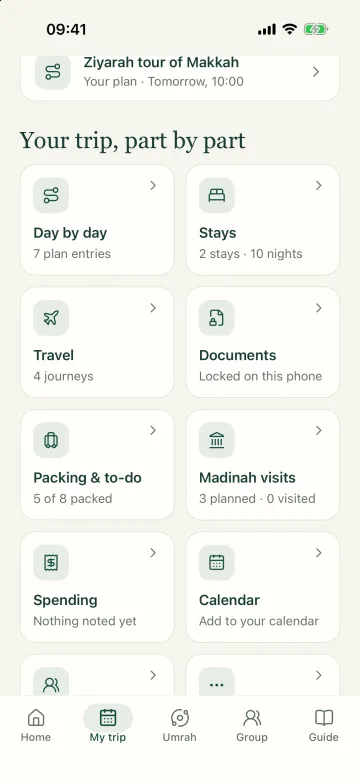
My trip: day by day, stays, travel, documents, packing and Madinah visits, each in its own card

Getting around

  • Taxi and shuttle details saved with the pickup point, ready to call or copy
  • About how long the walk from your hotel takes
  • “Start directions” opens your maps app for turn-by-turn directions
  • Hotel search, and maps with walking and driving routes inside the app, on the phone and the web (coming)
Maps and directions need internet. Offline navigation is not a launch feature.

Madinah

  • A separate visit, never a step of Umrah
  • The Prophet’s Mosque, Rawdah, Quba, Uhud and Al-Baqi, each with sourced details on getting there, arriving and facilities
  • How to book each place: a Nusuk permit for each person for the Rawdah; no booking needed for the Prophet’s Mosque, Quba, Uhud or Al-Baqi
  • Duas for each place, from named sources
  • Planned visits with times, meeting points and reminders you choose
Rawdah permits come from Nusuk; the app never books or guarantees an appointment. Al-Baqi has set visiting times that can change, so check locally. Place details name their sources.
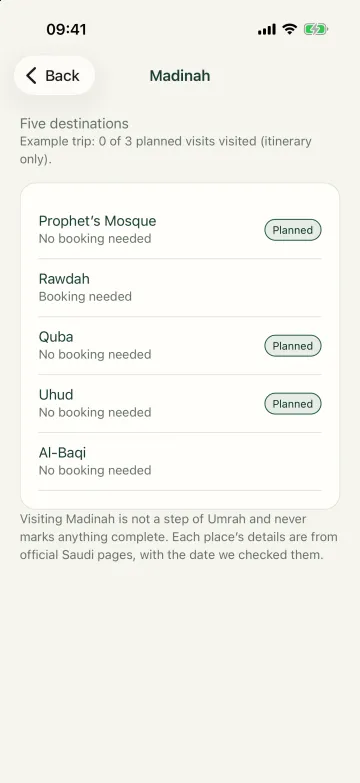
The Madinah guide: five places, which need booking, and three visits planned on the trip

Groups and privacy

  • Free groups with optional activity boards
  • Compare Tawafs, rounds or daily steps, each shared only if you choose
  • A trip pass for a group of any size, with a live group map, meeting points and check-ins (coming: not on sale yet)
  • With a trip pass, location shared only with people you name, for a limited time
  • Group results are counts people recorded, never a measure of worship
On iPhone, steps come from Apple Health, only after you allow it; if you don’t, the app shows no steps. Steps on Android, through Health Connect, are planned. No location history is kept. Organising or paying for a group never gives access to anyone’s location.
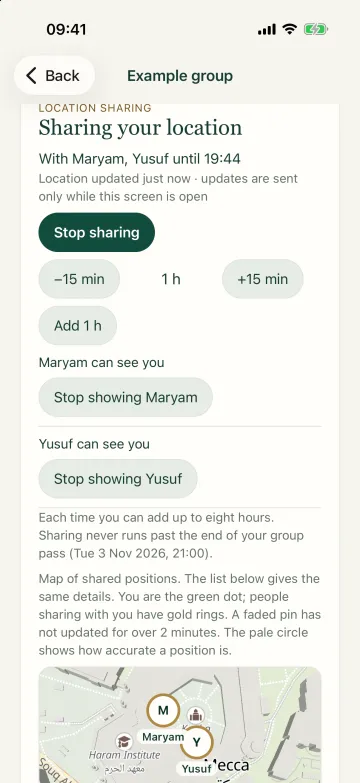
Sharing your location with two named people for an hour, with buttons to stop or change the time, and a map

Daily prayers

  • Prayer times for Makkah, Madinah and Jeddah
  • Your choice of Asr setting
  • Optional reminders at the start of each prayer you pick
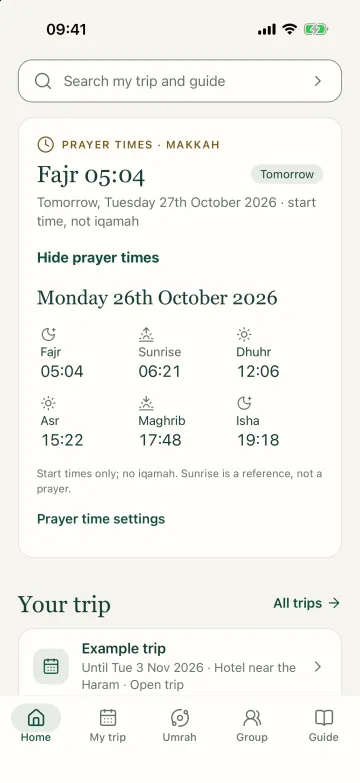
  • See today’s times for the city you are in, with the next prayer highlighted, so planning your day around prayer is easy.
Free core. The app shows start times only, never iqamah times.
Prayer times for Makkah: the next prayer, tomorrow’s Fajr, and the day’s start times, noted as start times and not iqamah

Practical AI (AI credits)

  • Draft itineraries, packing lists and messages for you to review
  • 10 free AI credits for each adult; one credit per successful action
  • Accepted plans become part of your trip and stay readable
AI never answers religious questions, and children cannot send it requests. During the invite-only pilot, the trip assistant is open to pilot places only.

On the web, too

  • The Umrah guide and duas, with recordings
  • Get ready, and Today: what comes next on your trip
  • My Trip and its tools: a readiness checklist, a pace planner, travel-time changes and reusing an earlier trip
  • Your Umrah history, and help and reunion cards to print
Counting Tawaf and Sa’i, the watch and starting location sharing stay on the phone.

Your settings, your data

  • Sign in with your Darb account: an emailed code, a password, or Sign in with Apple
  • Settings in clear categories, in the order a pilgrim needs them
  • “Large buttons” for bigger controls; the counters always stay large
  • Contact us from Settings, and read our replies there
  • Export everything we hold about you, or delete your account
  • Signed in with a Darb account? Delete only your Darb Umrah data and keep the account
Deleting gives you 14 days to change your mind. Security and privacy protections are checked in regular code reviews.

Be first to hear when it arrives

On your phone.
And at your desk.

iPhone and Android for your journey. The web for preparation and planning.